
Tapadoo Planner
Native Gantt planning for the Mac. Schedule the work, allocate the people, see the cost. All in one document.
- Native macOS
- Effort → cost
- Pay once
- No account
Mac App Store
€39.99. Pay once. No subscription, no account.
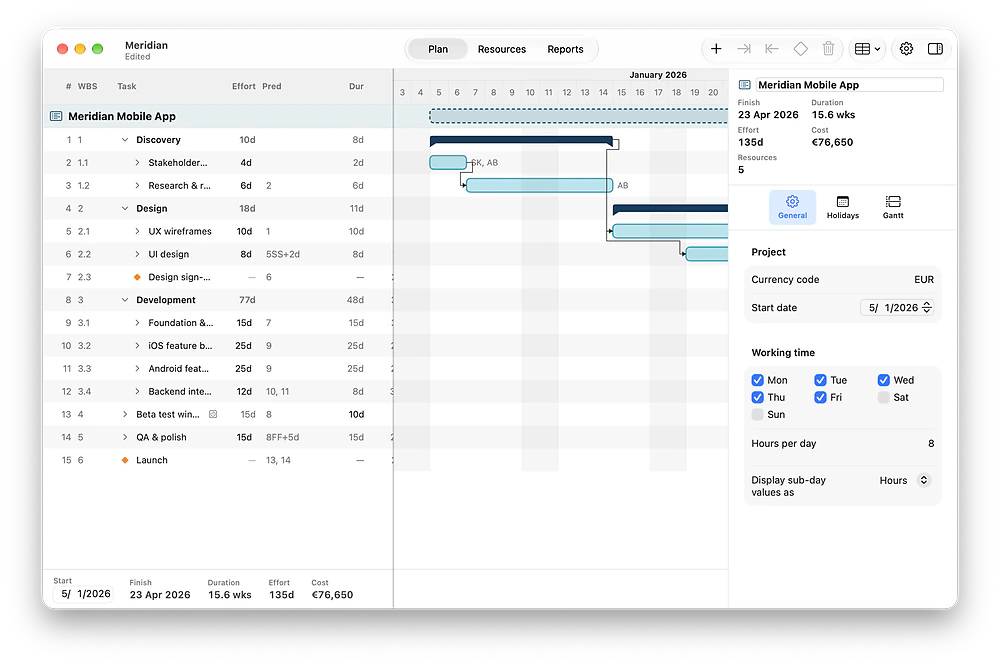
Built for the estimate
Tapadoo Planner is for the work before the work. Break the project down. Put people on it. Level the load. Price it. Send the client a clean PDF or web page. Then it stops. Nothing to maintain between projects. Nothing to renew.
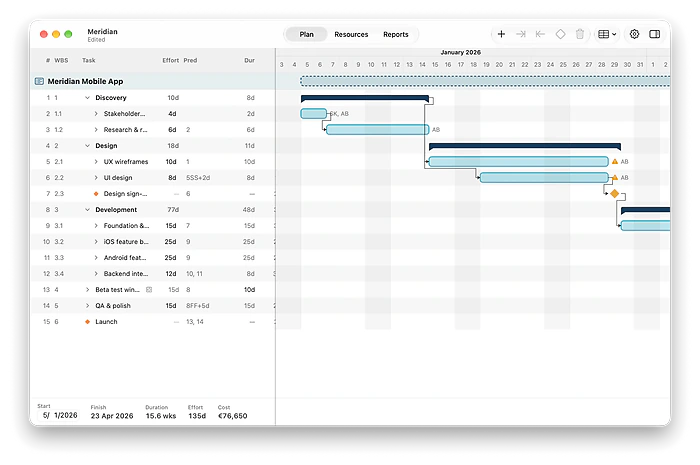
Plan the way you think about the work
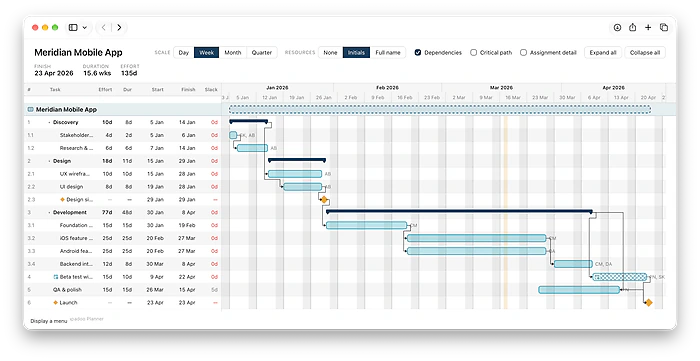
Add your tasks as a simple outline. Drag and drop your dependencies. Assign your resources. Tapadoo Planner does the rest.
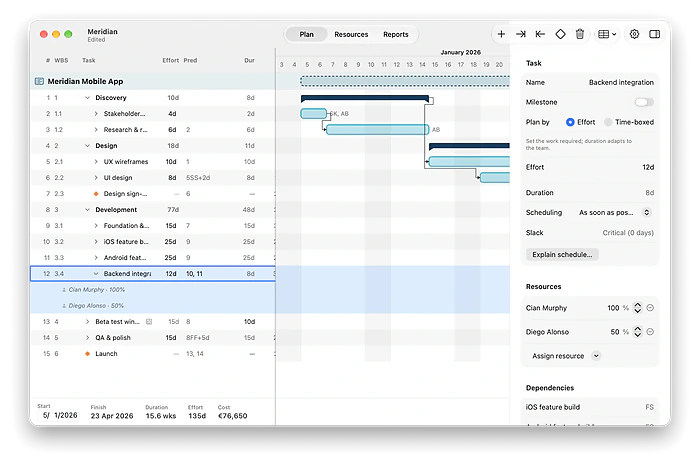
Put people on the work, and the dates follow
Add or remove people on a task and watch the timeline shift. Put more hands on it and it finishes sooner; move someone to part-time and it stretches. Allocation drives the schedule, so your dates always reflect who's really on the work.
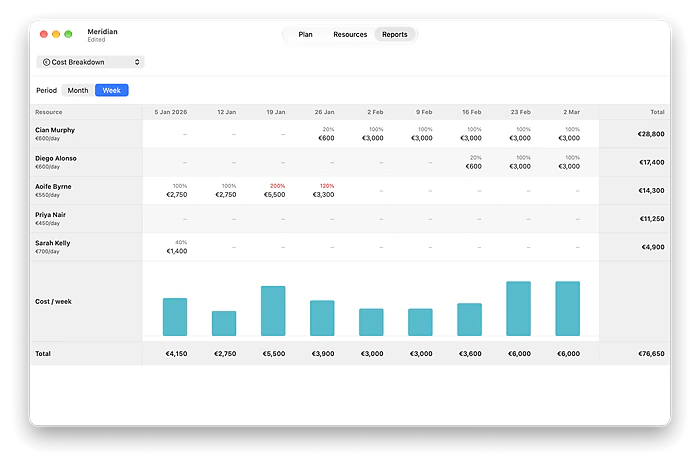
Price it from the plan
Give each person a day rate, and every task, phase and month is costed for you. The total rolls straight up from the plan, so the price you quote a client is built from real effort and rates, not guessed after the fact.
Share a plan anyone can open
Export the whole plan to a single web page and send it on. It opens in any browser, on any device, with nothing to install and no login. The Gantt, the dates and the costs come with it, exactly as you laid them out.
Everything an estimate needs
- Outline your work. Summary rows roll up effort and cost.
- Four dependency types, with lag and lead.
- Milestones and the critical path, at a glance.
- More people, shorter tasks. Part-time, longer ones.
- Automatic levelling. Nobody over-allocated.
- Day rates cost every task, phase, week and month.
- Working calendars. Public holidays in one click.
- Vector PDF or an interactive web page. You choose what the client sees.
- Opens and exports Microsoft Project XML.
Frequently asked questions
What do I need to run Tapadoo Planner?
A Mac running macOS 26 or later. Tapadoo Planner is a native Mac app, not a web app or an Electron wrapper.
How much does it cost?
€39.99, once, on the Mac App Store. US $34.99. UK £34.99. The App Store shows your local price. No subscription. No account. Most people plan in bursts, so you pay once and keep it for the next estimate.
Is it for managing a project day to day?
No. Tapadoo Planner is for the estimate: the plan, the schedule and the price, before the work starts. It isn't built to run the project once it starts. That's deliberate. There's nothing to keep up to date between projects.
Is my data private? Where are my plans stored?
Your plans are ordinary documents saved on your Mac. There's no account and no sign-in, and nothing leaves your Mac unless you export or share it yourself. See our Privacy Policy for the detail.
Can I share a plan with someone who doesn't have the app?
Yes. Export the whole plan to a self-contained web page that opens in any browser, on any device, or export to PDF. Neither needs the app.
How do costing and scheduling work?
Give each person a day rate and every task, phase and month is costed for you, rolling up to a total for the project. Set the effort for a task and Tapadoo Planner computes the duration from who's allocated to it.
Ready to plan your next project?
A native Mac app, yours for a one-off price of €39.99 or local equivalent. No subscription, no account. Just local, private planning.
Download on theMac App Store